

Every business has recurring expenses. Rent, supplier invoices, contractor payments, insurance premiums, software subscriptions, and advertising bills all take money out of the company. But what if some of those payments could also earn rewards?
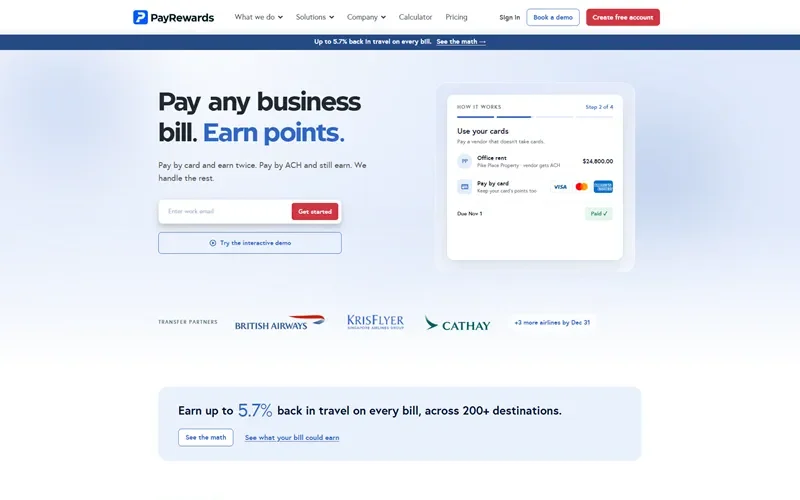
That’s the idea behind PayRewards. It’s a business payment platform that helps US companies pay everyday bills through credit cards or bank transfers while earning additional reward points.
What makes it interesting is that businesses can use it to pay vendors who don’t normally accept credit cards. PayRewards handles the payment and sends the money to the vendor through methods such as ACH, wire transfer, or check.
In this review, I’ll explore how PayRewards works, its main features, potential benefits, pricing, and whether it’s worth considering for your business.
What Is PayRewards?
PayRewards is a business payments and rewards platform designed for US companies. It helps business owners and finance teams manage vendor payments while earning PayRewards Points on eligible transactions.
Businesses can use it to pay expenses such as:
- Supplier and vendor invoices.
- Commercial rent.
- Contractor and freelancer payments.
- Insurance premiums.
- Software subscriptions.
- Advertising expenses.
- Other eligible business bills.
The platform is particularly interesting because it can turn payments that traditionally earn no credit card rewards into opportunities to collect points.
PayRewards is built by the team behind the Australian payment platform Pay.com.au and has expanded into the US market.
What I Like About PayRewards
1. Pay Vendors Who Don’t Accept Credit Cards
This is probably the most attractive feature of PayRewards.
Many businesses receive invoices from suppliers who only accept ACH, bank transfers, or checks. That means companies may miss out on credit card rewards even when they have a rewards card available.
PayRewards helps solve this problem. You fund a payment using an eligible credit card, and the platform sends the money to your vendor through their preferred payment method.
The vendor doesn’t necessarily need to accept cards or create a PayRewards account.
For businesses with substantial monthly expenses, this can create an opportunity to earn additional rewards on payments they already need to make.
2. Earn Rewards on Business Payments
PayRewards has its own rewards currency called PayRewards Points.
Its Core plan earns one point per dollar, while Plus earns two points per dollar on eligible payments.
An additional advantage is that businesses can potentially earn their regular credit card rewards alongside PayRewards Points when paying by card.
This means the same transaction can generate rewards from both the card issuer and PayRewards.
I like this concept because it gives business owners another way to get value from routine expenses. However, the rewards should always be compared against transaction fees before making a payment.
3. Multiple Payment Methods
Not every business wants to use a credit card for every expense.
PayRewards supports several funding methods, including:
- Visa, Mastercard, and American Express.
- ACH bank transfers.
- Domestic wire transfers.
- Checks.
This flexibility is useful because businesses can choose how to fund payments depending on their cash flow, card rewards, and transaction costs.
ACH payments are particularly interesting because they can earn PayRewards Points without the standard card processing fee.
4. Flexible Rewards Redemption
Earning points is only useful if you have practical ways to spend them.
PayRewards offers several redemption options, including:
- Travel: Transfer eligible points to participating airline loyalty programs.
- Gift cards: Redeem points for gift cards from more than 100 brands.
- Business expenses: Apply points toward eligible invoices.
- Employee rewards: Send points to team members as recognition.
- Premium experiences: Explore selected travel and concierge reward options.
I particularly like the option to put points back into the business by using them toward invoices. Not every company wants to spend its rewards on personal travel, so having business-focused redemption options is a useful addition.
5. Better Payment Organization
Managing payments through multiple bank accounts, cards, and spreadsheets can become difficult as a company grows.
PayRewards provides a centralized dashboard where businesses can manage payees, create payments, monitor payment status, and review upcoming transactions.
It also supports recurring payments, which can help reduce repetitive administrative work.
For companies handling regular supplier invoices and contractor payments, this can make payment management more organized.
6. QuickBooks Integration
Accounting integration is important for businesses that want to keep their financial records accurate.
PayRewards supports QuickBooks Online integration, allowing businesses to import unpaid bills, initiate payments, and synchronize payment statuses.
It can also help record PayRewards fees and manual payments in the accounting workflow.
This reduces the need to manually enter the same financial information in multiple places.
7. Mobile App for Payment Management
PayRewards also offers an app for iPhone and Android.
Users can make certain payments, authorize transactions, add payees, and monitor payment status from their mobile devices.
This can be useful for business owners who need to approve payments while away from their desks.
The web dashboard still handles some administrative activities, including recurring payment setup, invoice imports, and reward redemption.
Who Should Consider Using PayRewards?
PayRewards is designed primarily for US businesses that regularly pay vendors, contractors, and other business expenses.
I can see it being particularly useful for:
- Small businesses: Earn rewards on routine operating expenses.
- Digital agencies: Pay contractors, software providers, and advertising bills.
- E-commerce businesses: Manage supplier invoices and other recurring expenses.
- Franchise owners: Organize substantial recurring business payments.
- Consulting firms: Pay freelancers, vendors, and service providers.
- Growing companies: Centralize business payments and introduce more structured payment approvals.
Businesses with substantial monthly expenses may have more opportunities to benefit, provided the rewards justify the fees.
How Much Does PayRewards Cost?
PayRewards advertises free account registration with no monthly subscription fee or setup fee. Instead, businesses pay transaction-related fees depending on how they fund payments and whether they choose to earn points.
Here’s the basic fee structure:
| Payment option | Fee |
|---|---|
| Credit card processing | 2.9% |
| Core rewards | 1.75% |
| Plus rewards | 3.25% |
| ACH funding | No standard service fee |
The rewards fees are additional to the card processing fee when applicable. Businesses can also choose to make payments without earning PayRewards Points and avoid the associated rewards fee.
For example, a $10,000 payment funded by credit card with Core rewards would involve approximately $465 in fees: $290 for card processing and $175 for rewards.
This is why I wouldn’t recommend using PayRewards simply to collect points without calculating the actual value of those points first.
Travel redemptions can offer different values depending on availability and how points are used. Gift cards have a stated redemption value of approximately 1.4 cents per point.
Always review the final fee and reward estimate displayed before confirming a payment.
The Pros and Cons
Pros
- Earn rewards on eligible everyday business payments.
- Pay vendors who don’t accept credit cards.
- Supports credit cards, ACH, wire transfers, and checks.
- Potential to earn credit card rewards and PayRewards Points together.
- Multiple redemption options, including travel and gift cards.
- Supports contractor, supplier, rent, and other business payments.
- QuickBooks Online integration.
- Mobile app for payment approvals and tracking.
- No monthly subscription or setup fee advertised.
Cons
- Primarily designed for eligible US businesses.
- Credit card processing and rewards fees can add up.
Is PayRewards Worth Considering?
I think PayRewards is worth considering for businesses that already spend significant amounts on vendor invoices, rent, contractors, and other recurring expenses.
Its biggest advantage is the ability to pay vendors through their preferred payment methods while potentially earning additional rewards.
However, the economics matter. A business should calculate its card rewards, PayRewards Points, processing fees, and rewards fees before deciding which payment method makes sense.
For example, a company earning valuable travel rewards might find the platform attractive, while a business that prefers to minimize transaction costs may be better off paying vendors directly through ACH.
I’d recommend testing the payment calculator and comparing the expected rewards with the actual fees before committing to regular use.
My Final Thoughts
What I like about PayRewards is its approach to business expenses. Companies already spend money on rent, suppliers, contractors, and everyday operations. Finding ways to get additional value from those payments is an interesting idea.
The ability to pay vendors who don’t accept credit cards, combine card rewards with PayRewards Points, and redeem points for travel, gift cards, or business invoices makes the platform worth exploring.
It’s not automatically a money-saving solution, because fees can outweigh the value of the rewards. But for US businesses with substantial payment volumes and a clear rewards strategy, PayRewards could be a useful addition to their financial toolkit.
If your company regularly pays business invoices and wants to explore ways to earn rewards on those expenses, I’d recommend taking a closer look at PayRewards.
Check it out – Get Started With PayRewards Now