

Managing customer relationships doesn’t always require a complicated CRM with dozens of dashboards and features. Sometimes, the biggest challenge is simply keeping track of conversations, remembering follow-ups, and knowing where every potential customer stands.
If your business already relies heavily on Gmail, switching between your inbox and a separate CRM can feel like unnecessary work.
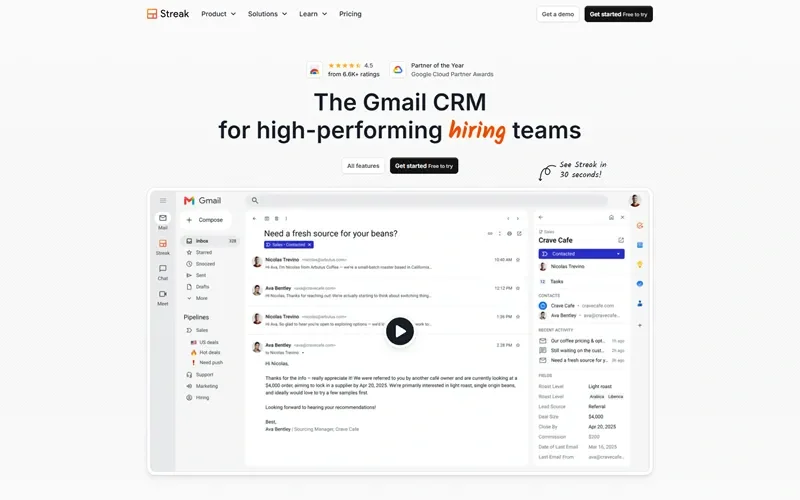
That’s where Streak comes in. It’s a customer relationship management (CRM) platform built directly into Gmail, allowing users to manage sales pipelines, track customer conversations, organize leads, and collaborate with teammates without constantly switching between applications.
In this review, I’ll explore what makes Streak interesting, its main features, and whether it’s a good choice for businesses that want a simpler way to manage customer relationships.
What Is Streak?
Streak is a Gmail-based CRM designed for individuals, startups, sales teams, agencies, and businesses that manage relationships through email.
Unlike traditional CRM platforms that operate through separate websites or applications, Streak works inside your Gmail inbox. It adds CRM functionality to the email environment you’re already familiar with.
Users can create pipelines, organize contacts, track deals, manage tasks, share email conversations, and monitor customer interactions.
What I find interesting about Streak is its simplicity. Instead of asking businesses to completely change how they work, it builds CRM features around an existing email workflow.
What I Like About Streak
1. CRM Directly Inside Gmail
This is probably Streak’s biggest advantage.
Many CRM platforms require users to open another application, search for customer information, update records, and then return to their inbox to continue communicating.
Streak brings these activities into Gmail.
You can organize customer conversations, update deal information, and manage your sales pipeline without leaving your inbox.
For small teams that already use Gmail for most business communication, this can make daily work feel much more convenient.
2. Customizable Sales Pipelines
Every business has a different sales process. A software company might track leads, product demonstrations, proposals, and closed deals, while an agency might manage inquiries, consultations, contracts, and project onboarding.
Streak allows users to create customizable pipelines for different workflows.
You can organize opportunities into stages, add custom fields, assign team members, and monitor progress.
I like this flexibility because Streak isn’t limited to sales. Businesses can also use pipelines for recruiting, partnerships, fundraising, customer support, and other relationship-based processes.
3. Email Tracking
Knowing whether someone has opened an email can be useful when managing sales conversations and business outreach.
Streak includes email tracking that can notify users when tracked messages are viewed. It can also show link activity, helping users understand whether recipients are engaging with their messages.
For sales professionals and business development teams, this information can help prioritize follow-ups.
Of course, email tracking isn’t always perfectly reliable because privacy settings and email clients can affect tracking signals. It’s best treated as an indicator rather than definitive proof that someone has read a message.
4. Mail Merge and Automated Follow-Ups
Sending individual emails to hundreds of prospects can take a lot of time.
Streak’s mail merge feature allows users to send personalized emails to multiple recipients using templates and contact information. It also supports scheduled follow-up messages.
This can be helpful for sales teams, recruiters, agencies, and businesses running personalized outreach campaigns.
I particularly like the idea of keeping these activities connected to Gmail because users can manage their outreach without introducing another complicated email platform.
However, businesses should still follow applicable email marketing laws and Gmail sending limits when running campaigns.
5. Team Collaboration
Managing customer relationships becomes more difficult when multiple employees communicate with the same prospects.
Streak includes shared pipelines, automatic email sharing, internal comments, task assignments, and contact management.
This helps team members understand the history of a relationship without having to ask colleagues to forward old emails or explain every interaction.
For agencies and small sales teams, having shared visibility can make collaboration much easier.
6. Tasks and Follow-Up Reminders
One of the easiest ways to lose a potential customer is to forget to follow up.
Streak includes task management and reminders that help users organize their next steps.
You can assign tasks, schedule follow-ups, and monitor which opportunities need attention.
I think this is a practical feature because a CRM should do more than store contact information. It should help users take action and keep business relationships moving forward.
7. AI-Powered CRM Features
Streak has also introduced AI-powered capabilities through its AI Co-Pilot.
Depending on the subscription plan and available AI credits, users can generate deal summaries, autofill information, ask questions about deal history, and create meeting agendas.
These features can help sales teams understand customer conversations faster without manually reviewing every email.
For businesses handling many leads and ongoing conversations, this could save time.
Who Should Consider Using Streak?
Streak is particularly suitable for businesses and professionals that depend heavily on Gmail to communicate with customers, partners, and prospects.
I can see it being useful for:
- Startups: Organize potential customers, investor conversations, and partnership opportunities.
- Sales teams: Track leads, manage deals, and schedule follow-ups.
- Digital marketing agencies: Manage client inquiries, proposals, and business development activities.
- Recruiters: Track candidates and organize hiring pipelines.
- Freelancers and consultants: Keep customer conversations and project opportunities organized.
- Small businesses: Manage customer relationships without adopting a complicated standalone CRM.
If your team already works inside Google Workspace, Streak may feel like a natural addition.
The Pros and Cons
Pros
- Works directly inside Gmail.
- Easy-to-understand CRM interface.
- Customizable pipelines for different business workflows.
- Email and link tracking.
- Mail merge with scheduled follow-ups.
- Shared pipelines and team collaboration.
- Task management and reminders.
- AI-powered deal summaries and other productivity features.
- Integrations with Google Workspace and other business applications.
Cons
- Primarily designed around Gmail and Google Workspace.
- Businesses needing advanced CRM functionality may find it limiting.
- Paid plans are charged per user, which can become expensive as teams grow.
- Some integrations and automation features require higher-tier plans.
- Email tracking can be affected by recipient privacy settings and email clients.
How Much Does Streak Cost?
Streak offers free email productivity tools, including email and link tracking, snippets, and limited mail merge functionality.
For businesses that need full CRM capabilities, it offers three main paid plans:
- Pro: $49 per user/month when billed annually.
- Pro+: $69 per user/month when billed annually.
- Enterprise: $129 per user/month when billed annually.
Monthly billing is more expensive. Streak also offers a 14-day free trial of Pro+ for businesses that want to explore its advanced features before committing.
Pricing and included features can change, so I’d recommend checking the official pricing page before choosing a plan.
Is Streak Worth Considering?
I think Streak is worth considering if your business already uses Gmail as its primary communication tool and you want a straightforward way to manage customer relationships.
Its biggest strength is convenience. You don’t need to learn an entirely separate CRM interface just to organize leads, track conversations, and manage follow-ups.
However, Streak isn’t necessarily the best fit for every organization. Businesses that need complex marketing automation, extensive customer service tools, or advanced enterprise reporting may prefer a more comprehensive CRM platform.
For smaller teams, startups, consultants, and agencies, though, Streak offers a practical alternative to traditional CRM software.
My Final Thoughts
What I like most about Streak is its approach to CRM. Rather than trying to replace the way people already work, it adds useful customer management tools directly to Gmail.
That makes it particularly attractive for businesses that want better organization without introducing another complicated system.
The combination of customizable pipelines, email tracking, mail merge, collaboration, and AI-powered features gives users a useful set of tools for managing business relationships.
It’s not the most comprehensive CRM available, and its dependence on Gmail won’t suit every company. But if your daily business operations revolve around email, Streak is definitely worth exploring.
For startups, agencies, freelancers, and small sales teams looking for a simpler way to manage leads and customer conversations, it could be a very practical choice.
Check it out — Try Streak Now